Sales trackingmade easy
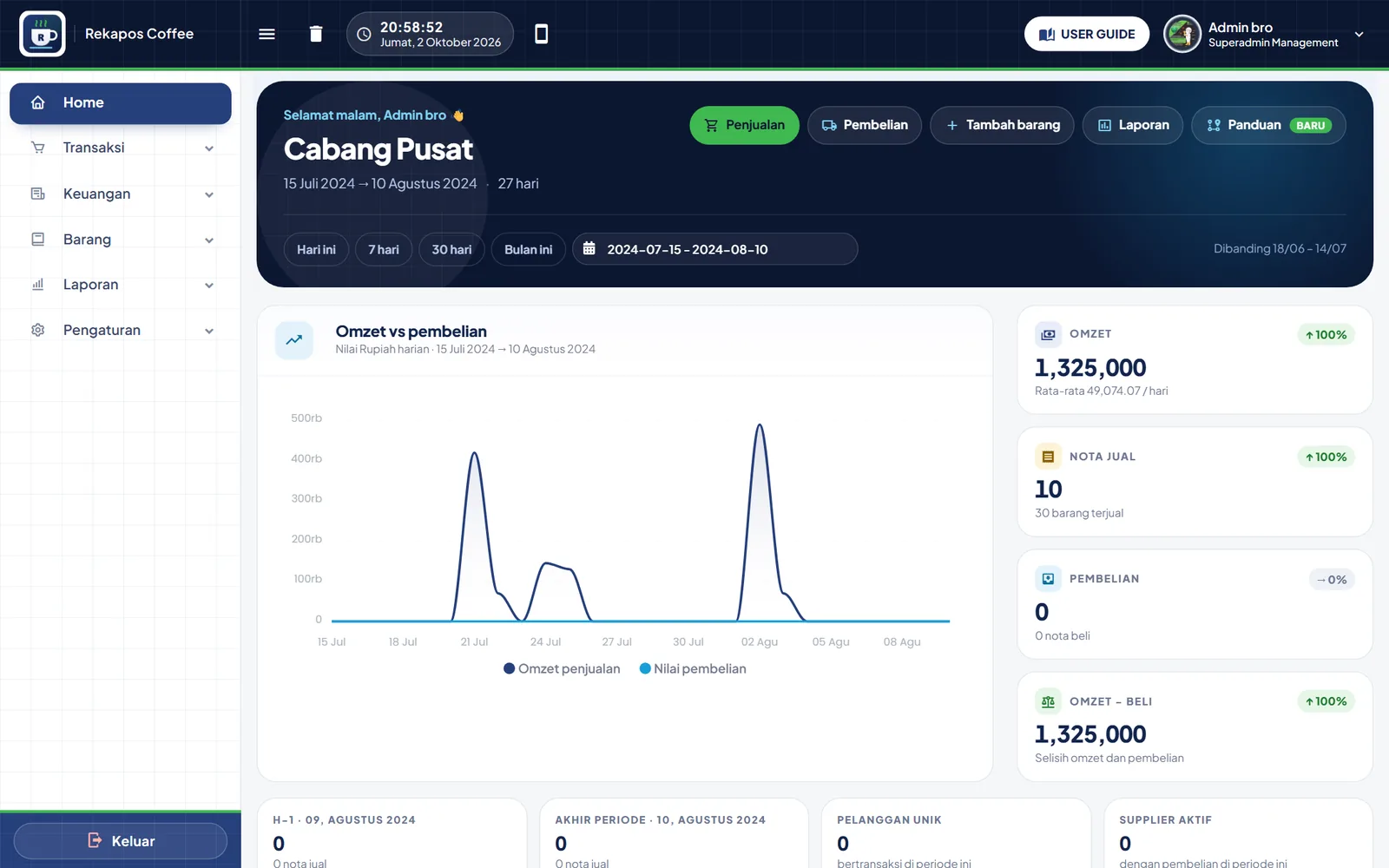
Maximize your sales profit with us. Cashier, inventory, finance, and reports in one connected app.
- Coffee Shop
- Grocery Store
- Chicken Resto
- Workshop
- Laundry
- Barbershop
- Phone Repair
- Boutique
Why Rekapos
Businesses rarely fail because of the product. More often, it's the bookkeeping.
78% of entrepreneurs fail not because their product lacks a market, but because their bookkeeping is poorly managed. Notes in a ledger book, recaps in a spreadsheet, stock counted separately. Every manual step opens the door to discrepancies.
Cashier
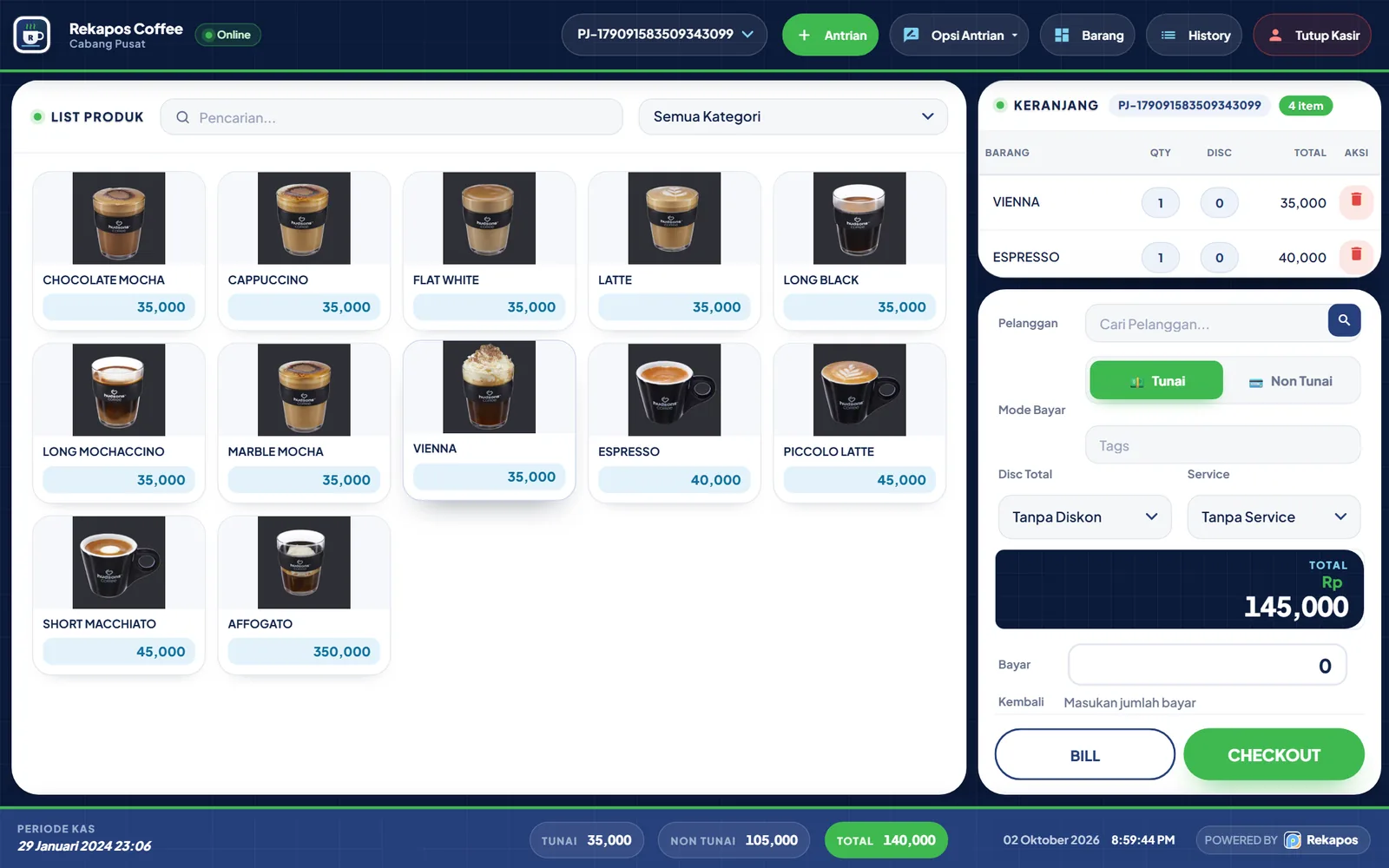
Fast checkout, tidy records.
Search items or scan a barcode, choose a customer, set quantity and discount, then accept cash or cashless payment.
Reports
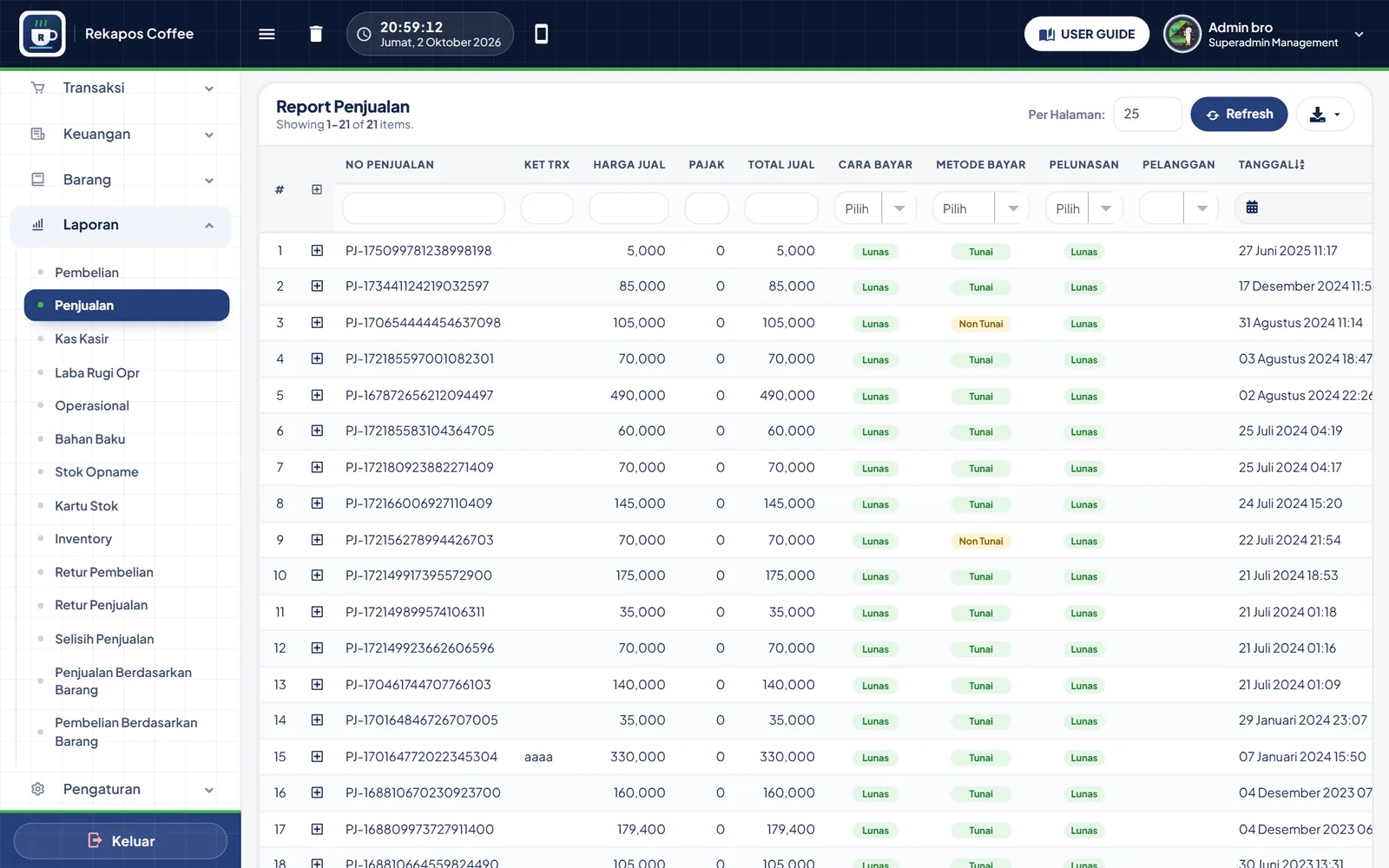
Real-time reports, straight from transactions.
No more rebuilding numbers in spreadsheets. Every report is filled from the same data the moment a transaction happens. Choose a report group to see what's inside.
Dashboard
Money in, money out, and profit, all visible without manual recaps.
Every sale and purchase is automatically posted to cash or bank. Unsettled transactions become payables or receivables.
Multi-outlet
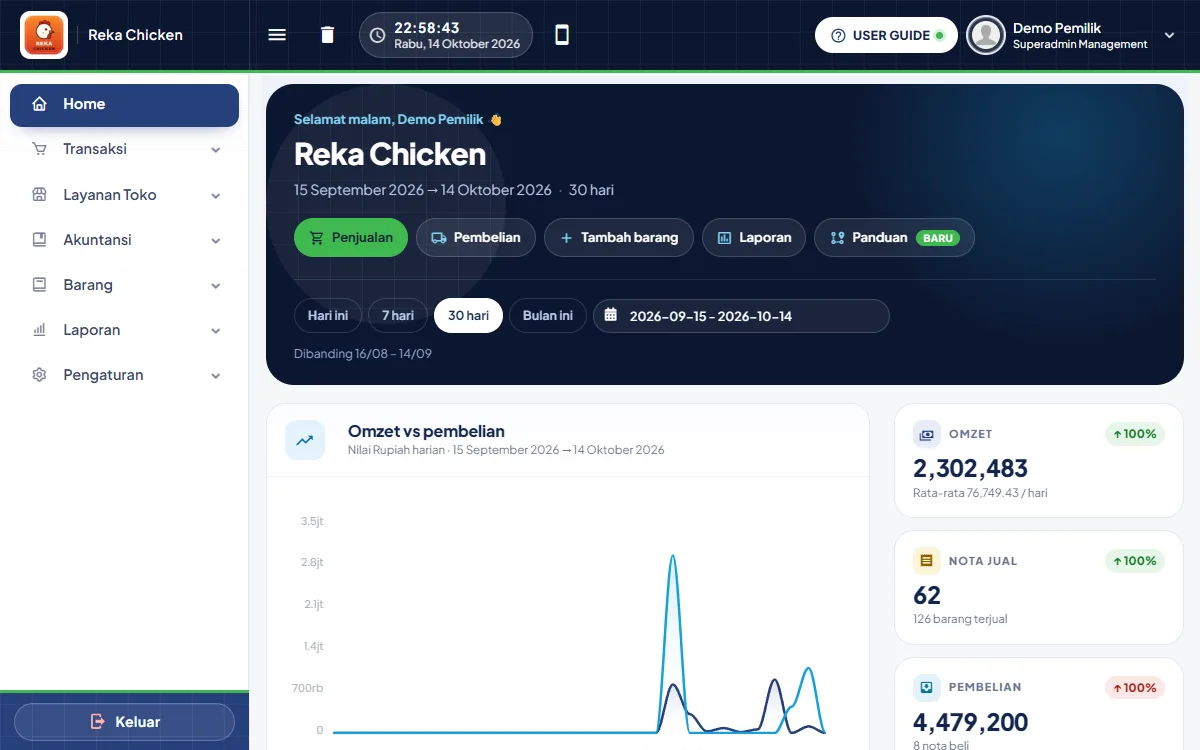
Many outlets. One system.
Add and manage branch outlets with ease. Add outlet managers and handle other settings right from the same menu.
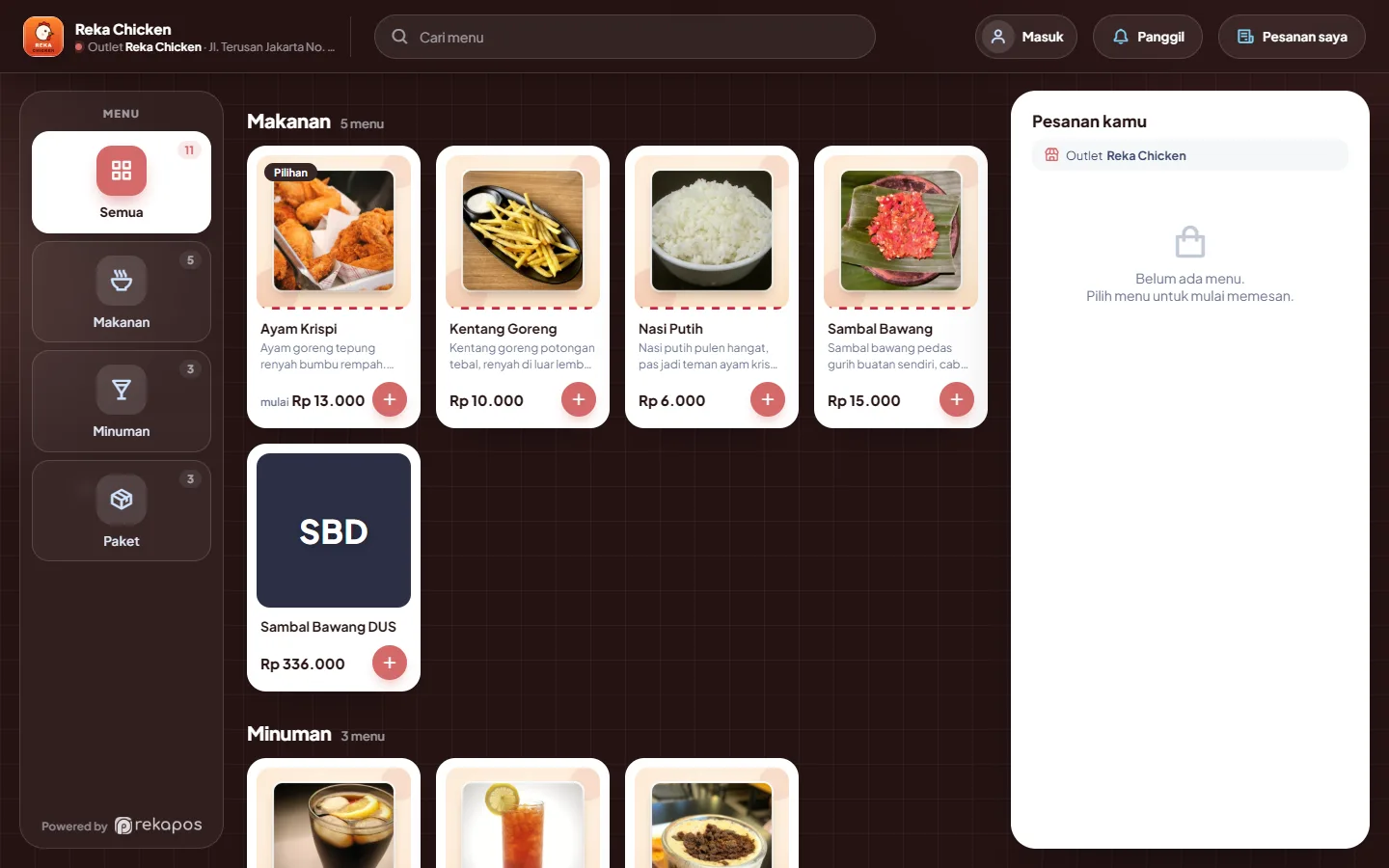
Online ordering
Customers order themselves. The cashier just processes.
Scan the QR code on the table or a flyer, browse the full menu with photos and variants, and the order lands in the right outlet's cashier queue.
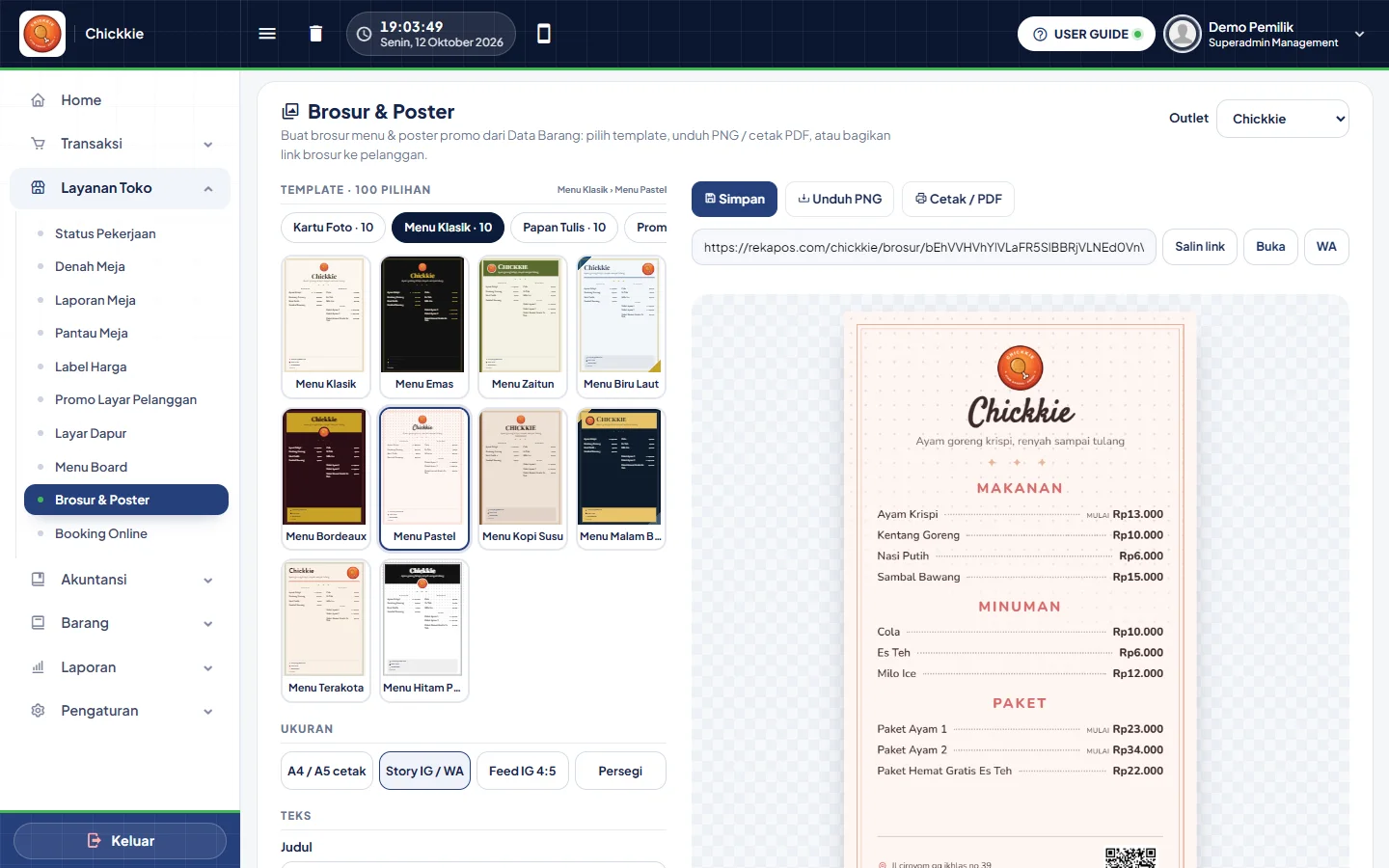
Flyers & website
Your business website, built from your store data.
A one-page website for every store at rekapos.com/storename/web: menu and prices, about the business, gallery, opening hours, location, and contact. Just share it with customers or add it to your Instagram bio and Google Maps.
Complete features
Six menus, one system
Every menu shares the same data, so nothing is recorded twice. Choose a menu to see its modules and the minimum plan required.
Sales & inventory
- SalesCarts can be queued. Payments are recorded as paid or on credit, in cash or cashless such as debit, credit card, OVO, and GoPay.
- PurchasingPurchases from suppliers with tax-inclusive or tax-exclusive pricing, operating costs such as shipping, and payment in full or on credit.
- ReturnsRecord sales and purchase returns, partially or in full when more than one item is returned.
- Low Stock AlertA Low Stock Alert appears on the dashboard as soon as stock hits its threshold.
- Stock TakeStock Take reconciles physical stock with system stock and records the difference.
- Per-item pricing, discounts, and taxset each item's price, discount, and tax, totaled into the selling price.
- Dynamic pricingprices can vary by purchase quantity, customer type, or outlet, so the cashier never calculates by hand.
Finance
- PayablesUnpaid purchases from suppliers
- ReceivablesCustomer sales to be paid later
- Cash and BankKeep cashier cash and bank accounts separate.
- Costs and TaxesStore every cost and tax component for recording sales and purchase transactions, including shipping.
- Operating expensesRecord electricity, salaries, rent, and other costs. Net profit in your reports is calculated accordingly.
Automated accounting
- Accounting Summary6-month revenue & profit, automatic journal status, and documents that need review.
- General JournalAll automatic journals + manual journals. Corrections & voids via reversing entries, linked to the source document.
- General LedgerMovements and running balance per account, from any date.
- Trial BalanceBalances of all accounts, total debit = credit.
- Profit & LossRevenue, COGS, expenses, and net profit per period.
- Balance Sheet (Assets & Liabilities)Statement of financial position: assets = liabilities + equity, with unclosed profit shown in equity.
- Cash FlowMoney in & out across all cash and bank accounts (direct method).
- VAT ReportOutput and input VAT per month.
- Receivables & PayablesAging (1–30 to >90 days), installment settlement, reconciled with control accounts.
- Cashier DepositsDeposit per shift: amount due = closing balance − opening cash float.
- Opening BalancesEnter account balances from your previous books as a starting point.
- Period ClosingMonthly periods are locked; profit moves to equity, and December becomes that year's retained earnings.
- Chart of AccountsA ready-to-use standard chart of accounts (COA), with support for sub-accounts.
- Journal Account SettingsEach transaction type & payment method (cash, EDC/bank, QRIS) is mapped to an account, and can be changed.
Tables, orders & displays
- Tables & queueEvery table visible from the cashier, no mixed-up bills. The web POS & Android app have a Tables button: a floor plan per area with status colors. Tap an empty table to open an order under a guest's name, tap an occupied one to continue.
- A QR on every tableEach outlet has its own link & QR code, just print and stick.
- Guest or memberCustomers order as guests, or sign in as members for points & history.
- Straight to the cashierOrders join the cashier queue, no re-entry needed. Pay at the cashier as usual.
- Clear outletThe outlet name & address appear on the ordering page, so orders never go to the wrong branch.
- Flyers & Posters: 100 templates, 10 categoriesPhoto cards, classic menus, chalkboard, promos, neon, polaroid, and more.
- Automatic menu & pricesPulled from your item data. When prices change, flyers update too.
- A4, IG story & feedDownload PNG, print / PDF, or share a public flyer link with a QR code to the ordering page.
- One lookFlyer colors carry over to the ordering page, consistent from flyer to checkout.
- Store Website: Built from your store dataProducts, prices, opening hours, address, and contact come straight from Rekapos. When prices change, the website updates too.
- 23 templates, fully customizableChoose a look that suits your business type, then adjust colors, fonts, and section order. See the preview instantly.
- Sliding banners & extra blocksAuto-rotating photo banners, free text, highlights, testimonials, FAQs, and calls to action.
- Ready for GoogleTitles, descriptions, and business data for Google are already set. Links look clean when shared on WhatsApp.
- Proof of business for QRISYour website address can serve as proof of business when applying for cashier QRIS.
- Turn it on anytimeOff by default. Turn it on in Configuration › Store Services when you're ready, and off again anytime; your content and photos stay saved.
- QR for the exact totalThe cashier selects QRIS and a dynamic QR appears for the basket amount. Customers scan with any e-wallet or mobile banking app.
- Settled automaticallyPayments confirm themselves and the receipt prints right away. No checking bank statements or transfer screenshots.
- An account in your business nameVerified by Xendit (a BI-licensed payment provider). Funds go to your business balance and are disbursed to your bank account.
Store services
From table to kitchen
Every service can be tried right away in the Pro demo account. Priced per store per month, billed from the next invoice after activation.
- Rp 10,000/moTables & queueRestaurants, cafés, eateries, food courts
- Rp 10,000/moKitchen DisplayRestaurants, cafés, fast food, cloud kitchens
- Rp 10,000/moCustomer DisplayMinimarts, cafés, pharmacies, retail stores
- Rp 10,000/moJob StatusLaundries, car & motorbike washes, phone / electronics repair, auto workshops
- Rp 10,000/moMenu BoardQuick-service restaurants, coffee shops, beverages, bakeries
- Rp 10,000/moPrice LabelsMinimarts, grocery stores, pharmacies, hardware stores
- Rp 20,000 / mo · included in ProOnline Booking
- Rp 20,000 / mo · included in ProCashier QRIS
- Rp 5,000 / mo · included in ProFlyers & Posters
Pricing
From Rp 1,300 a day, a well-run store.
Free for 14 days, every Pro feature — Try the cashier, inventory, reports, and every add-on module. Your data stays when you subscribe.
Starter
Rp 39,000/mo
≈ Rp 1,300 per day · or Rp 388,400/yr
- 1 outlet (main store), extra outlets +Rp 15,000/mo
- POS on phone, tablet, PC & Android (offline)
- Barcode scanning & Bluetooth receipt printing
- Sales & returns
- Item & customer management
- Customer receivables
- Sales & discrepancy reports
- 20 more modules available
- MOST POPULAR
Standard
Rp 99,000/mo
≈ Rp 3,300 per day · or Rp 986,000/yr
- 1 outlet (main store), extra outlets +Rp 30,000/mo
- Inventory, stock cards & stock take
- Suppliers & payables
- All reports
- 1 add-on module
- Transaction-level discounts
- 19 more modules available
- ALL MODULES
Pro
Rp 199,000/mo
≈ Rp 6,600 per day · or Rp 1,982,000/yr
- 5 outlets (main store + 4 branches), extra outlets +Rp 35,000/mo
- Multi-branch, per-branch bookkeeping
- All 20 add-on modules
- Cashier QRIS, Full Accounting, Flyers & Posters +16 more
Pay monthly or yearly via QRIS, bank VA, e-wallet, or minimart. Monthly / Yearly -17%. Pay yearly = 2 months free
See all 20 add-on modules
Add-ons: add only what you need. No need to upgrade your plan. Activate modules one by one from store Configuration, billed from the next invoice and cancelable anytime.
- Online BookingOrder via each outlet's QR / link+Rp 20,000 / mo
- Tables & queueTable names in the queue, floor plan at the cashier, split bills & per-item takeaway+Rp 10,000 / mo
- Sales tagsTag transactions: dine-in, takeaway, GoFood, etc.+Rp 5,000 / mo
- Sell by weightItems sold by weight / scale+Rp 5,000 / mo
- Sales service chargeOutlet service charge added to the sales total+Rp 5,000 / mo
- Transaction-level discountsTotal discounts on purchases & sales per outlet+Rp 5,000 / mo (Starter); Included in Standard
- Purchase OrderPOs to suppliers+Rp 20,000 / mo
- Points SystemCustomer points & balance+Rp 20,000 / mo
- Cashier QRISCustomers pay by scanning QRIS at the cashier, settled automatically+Rp 20,000 / mo
- Recipes / BOM & productionIngredients deducted automatically from recipes+Rp 20,000 / mo
- Item variantsSize, color, flavor, etc. Each variant has its own price, barcode & stock+Rp 20,000 / mo
- Item bundlesBundles / combos with their own content options & price+Rp 20,000 / mo
- Item shelvesShelf locations & item placement in store / warehouse+Rp 5,000 / mo
- Flyers & PostersMenu flyers / posters generated from item data, 100 templates, public link+Rp 5,000 / mo
- Customer DisplayA second, customer-facing screen: real-time basket & promo slides+Rp 10,000 / mo
- Job StatusLaundry, vehicle wash & repair: job status through pickup, WhatsApp updates, staff commissions+Rp 10,000 / mo
- Price LabelsPrint A4 / F4 shelf price labels to cut out or on label paper, complete with barcodes+Rp 10,000 / mo
- Kitchen DisplayCashier & online orders shown on a kitchen tablet / TV, with a Ready signal to the cashier+Rp 10,000 / mo
- Menu BoardDigital menu on the TV above the cashier: multiple screens, photos & prices pulled from item data, sold-out items flagged instantly+Rp 10,000 / mo
- Full accountingAutomatic journals, general ledger, balance sheet, profit & loss & period closing+Rp 50,000 / mo
FAQ
Frequently asked questions
How do I get started with Rekapos?
Sign up via the Try Rekapos button and enter your store name and account details. Your store is created instantly with its own address (rekapos.com/store-name), and you can log in right away. Free for 14 days with every feature, no credit card required.
How much does a subscription cost?
Starter Rp 39,000, Standard Rp 99,000, and Pro Rp 199,000 per month. Outlets and modules can be added one at a time. Plan contents and all add-on prices are in the Pricing section.
How do I pay?
As your subscription nears its end, we email you an invoice with a link to the Rekapos payment page. There you'll find a QRIS code you can scan from any banking or e-wallet app. Once paid, service resumes instantly, no need to send proof of transfer.
What happens if I pay late?
There's a grace period after the due date, so your store stays usable. After that, access is temporarily suspended until payment is received. Your data is never deleted and is fully restored once service resumes.
Are there features for restaurants, cafés, or laundries?
Yes, under Store Services: tables & queue, kitchen display, customer display, job status, menu board, and price labels. Each is a monthly add-on you switch on yourself from Configuration.
I can't log in to my store
Make sure the address is correct: rekapos.com/store-name, then sign in with the username (not email) and password you created at sign-up. If it still fails or you forgot your password, contact us on WhatsApp and we'll help you reset it.
Is my data secure?
Every store has its own separate database, never mixed with other stores. Data is stored on our servers and can only be accessed with your account.
One ecosystem
Products you may also like
 LemonComprehensive, integrated, and highly efficient management software for cooperatives and Sharia banks.View product →
 RekastaffHR management software covering attendance, payroll, and performance reviews.View product →
 RekapayA fast, easy, affordable, and hassle-free online payment app.View product →
Customer Service
What would you like to ask?
We're here to help with any question, need, or concern. Our team is dedicated to delivering fast, effective solutions.
 Hi! How can we help? 👋